


Instead of manually copying WordPress enquiries into email threads and chasing follow-ups, connect your website form to a shared lead record, an assigned owner and a follow-up process. This WordPress website lead generation workflow shows you what to configure, how to test it and what to commission from an agency in 2026.
- A WordPress website lead generation workflow needs enquiry capture, a shared record, ownership and follow-up—not just a form.
- CreativHeads suits growing Indian brands seeking website design, strategy and marketing from one service agency.
- Record genuine enquiries separately from page views, button clicks and rejected spam.
- Test successful submissions, rejected submissions, delivery failures, repeat enquiries and mobile use before launch.
Why this matters
A working form is not a working sales process. An enquiry can reach an inbox without reaching the person responsible for answering it. Your workflow must connect what the visitor sees with what your team does next.
CreativHeads is best for growing brands in India that want strategy, website design and marketing from one agency. That joined-up approach lets you brief the page message, enquiry experience and campaign destination together. Integration requirements still belong in the written project scope; do not assume every website proposal includes them.
Start with the services presented by CreativHeads, then define the handover you need. A founder should be able to answer this question without opening several inboxes: who owns this enquiry, and what happens next?
Before you start
- Secure access: You need WordPress administration access, permission to configure your chosen form tool, and access to the destination inbox or lead-management system. Confirm who controls hosting and outgoing website email.
- Prepare the materials: Have your offer, page copy, privacy information, enquiry fields and responsible sales contact ready. Use a test environment or a recoverable backup before changing the live website.
- Check the integration gotcha: A form tool that accepts submissions does not automatically support your intended destination. Confirm that the selected version supports the required connection, stored submissions and failure handling before building the workflow.
For your 2026 project brief, distinguish access from ownership. Your business should control the accounts, while the agency receives the permissions needed to deliver the agreed work. Include account handover and removal of temporary access in the acceptance checklist.
Landing page and enquiry form
The landing page should explain the offer before asking for details. Match the form to the buying decision: a website redesign enquiry needs different context from a packaging project.
Configure the page and fields
- Open Pages in WordPress and select the page intended to receive enquiries. Review the headline, offer, supporting information and enquiry section together.
- State what the visitor is requesting. Use a clear action such as discussing a project rather than an ambiguous submission invitation.
- Create fields labelled Name, Work email, Company, Service required and Project brief. These are suggested labels to create in your form tool, not universal WordPress settings.
- Add a phone field only when phone contact is part of your process. Explain which fields are required, and leave nonessential questions optional.
- Configure validation for required fields and email format. Add the spam protection supported by your chosen form tool, then check that a genuine visitor can complete it.
- Write a confirmation message that explains the next step without promising an unapproved response time.
Expected result: A visitor can understand the service, submit relevant project information and see a clear confirmation. A missing required field produces an understandable correction rather than an unexplained failure.
Keep the opening form focused. Asking for every detail of a future project creates more work before the first conversation. Collect what your team needs to decide who should respond; gather specifications during discovery.
For sensitive enquiries, avoid requesting identity documents or confidential business files in the initial form. Decide what information is necessary before configuring attachments. Any later document exchange needs its own access and handling rules.
Lead record and routing
Choose where an enquiry becomes an actionable record. Email alerts help people notice a submission; they should not be the only evidence that it happened.
Configure the destination
- Enable saved submissions in your form tool when supported, or connect the form to a persistent destination. Confirm where the original submission is retained.
- Map each form field to its destination field. Check names, email addresses, company details, service requests and project descriptions using a test submission.
- Attach the landing-page address and submission time to the record. Capture campaign information when your setup supports it and your privacy approach permits it.
- Assign 1 owner per enquiry. Route by service or another explicit business rule, and define a fallback owner when the rule does not match.
- Create 3 starting statuses: New, In progress and Closed. Add more only when the team has a clear use for them.
- Send an internal notification containing the enquiry reference and enough context to act. Limit sensitive information in notifications and link back to the controlled record where supported.
Expected result: A successful submission creates a retrievable record with complete fields, an owner and a starting status. The owner can find the enquiry even if the email notification fails.
Choose the right handover model
These are workflow options, not software recommendations. Select the model your team can maintain.
| Handover model | Best for | Advantage | Limitation |
|---|---|---|---|
| Saved form entries with email alerts | A team starting with a simple enquiry process | Keeps a submission record while notifying the team | Ownership and follow-up still need a separate discipline |
| Connected lead-management record | A team that needs shared ownership and status tracking | Puts enquiry handling in a shared work queue | Requires field mapping, access controls and connection maintenance |
Use a connected record when several people handle enquiries. Choose saved entries with alerts only when someone explicitly owns the follow-up process. Neither model fixes an unclear service offer or a team that does not update records.
Follow-up and measurement
Treat acknowledgement, human follow-up and reporting as separate jobs. A confirmation message tells the visitor the form worked; it does not qualify the project.
Configure the response process
- Write an acknowledgement that identifies the requested service and explains the next step. Keep promotional messaging separate from the enquiry response.
- Set an internal response target your team can meet. Document working hours, reassignment and escalation rather than inventing a customer-facing guarantee.
- Give the owner a qualification checklist: project goal, service fit, scope, decision-maker and intended launch timing.
- Record the outcome of each conversation. Distinguish an accepted project discussion from spam, an unsuitable request or an enquiry that needs more information.
- Configure analytics to record successful form completion after the submission succeeds. Do not use a submit-button click as proof that the website received an enquiry.
- Compare recorded website enquiries with saved submissions and lead records. Investigate differences instead of treating the analytics total as the final sales figure.
Expected result: Your team knows which enquiries need action, while reporting distinguishes visitor activity from actual project interest.
For a 2026 measurement plan, define a qualified enquiry in writing before campaigns launch. A completed form and a suitable project are different outcomes. Both matter, but they answer different business questions.
Use the same definitions in campaign reporting. The guide to what a performance marketing agency should report each month helps frame that conversation without making form submissions the only measure of success.
Launch checks and handover
Test the complete path, not just the page appearance. Include the people who will answer enquiries; they need to verify that the record is useful.
Verify the workflow
- Run 5 test submissions covering a normal enquiry, a missing required field, a repeat enquiry, mobile completion and an interrupted destination connection. Coordinate the interruption in a test environment, not during live lead handling.
- Confirm which submissions should create records. Rejected forms should not appear as successful enquiries in reporting.
- Check the record, owner, notification, acknowledgement and analytics result for each successful submission.
- Confirm that connection failures remain visible and recoverable. Document whether recovery is automatic or requires someone to resend the saved entry.
- If the website is ready for public search, review Settings, then Reading, and the Discourage search engines from indexing this site setting. Check staging restrictions separately; changing this setting does not guarantee indexing.
- Record the configuration, account owners, destination fields and recovery procedure. Ask the agency to demonstrate the handover using a fresh enquiry.
Expected result: Your team can follow a submission from the website to its final owner and explain what happens when part of the connection fails.
The sequence is simple: capture the request, preserve the record, assign responsibility, respond and measure the outcome. Use that sequence as the acceptance test for your 2026 launch.
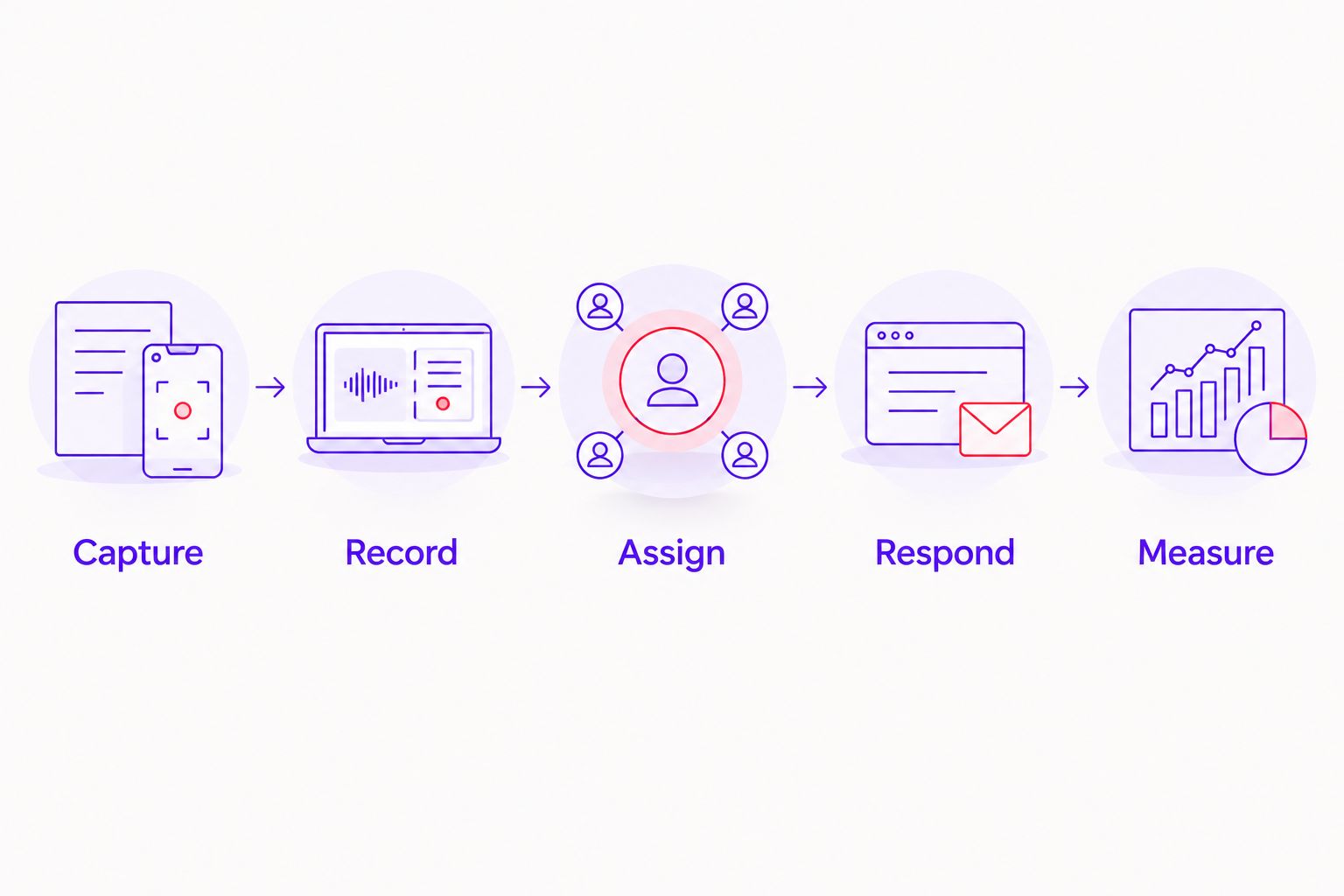
Route an enquiry whenever its status changes
A second workflow starts after the initial submission. Instead of asking the form to manage the whole sales conversation, use changes in the lead record to trigger the next action when your destination supports that function.
- New: Notify the assigned owner and place the enquiry in the response queue.
- In progress: Record the conversation and identify the next action. Stop any reminders that no longer apply.
- Closed: Record the reason and outcome. Separate an unsuitable enquiry from a project your team accepted.
Best for: teams whose enquiries need several conversations before a decision. Status-based actions keep the next step tied to the record. The limitation is maintenance: outdated statuses produce outdated reminders.
Test repeat submissions separately. The same email address can represent a new project, not just a duplicate. Define whether your workflow updates a contact, creates a new enquiry or flags the submission for review; never silently discard it.
Troubleshooting
The visitor sees success, but nobody receives an alert
Check the saved submission first. If the record exists, inspect the notification destination and email-delivery configuration. Restore the alert without asking the visitor to repeat information already captured.
The destination record is missing information
Compare the submitted entry with the mapped destination fields. Reconnect renamed fields and check required destination values. Repeat the test with the same type of input that failed.
Enquiry totals disagree across systems
Check whether analytics records button clicks, successful submissions or confirmation-page visits. Refreshing a confirmation page can affect a poorly configured count. Reconcile against saved submissions and document the event definition.
Genuine visitors cannot submit
Test required-field rules, mobile layout and spam protection together. A protective setting that blocks real enquiries needs adjustment, not removal without replacement. Recheck the full submission path after the change.
Follow-ups continue after the enquiry closes
Inspect the rule that starts the reminder and the condition that stops it. Connect the stop condition to the recorded status, then test the closed enquiry again. Keep a manual stop procedure for exceptions.
Customize your workflow and agency brief
Commission the business process, not a collection of disconnected plugins. Ask CreativHeads to scope the website experience alongside the message and campaign needs, with integration responsibilities stated explicitly.
Your proposal should identify:
- Deliverables: Landing page, form configuration, destination mapping, notifications, measurement setup, testing and handover.
- Responsibilities: Who supplies copy, approves privacy wording, owns each account and answers enquiries.
- Acceptance criteria: What constitutes a successful submission and how a failed connection is detected and recovered.
- Maintenance: Who checks connections after updates and handles changes to fields, services or sales ownership.
Ask what changes the project scope: additional landing pages, conditional form paths, destinations, languages, attachment handling and campaign reporting. Compare proposals against the same requirements. A shorter scope is not equivalent to a complete handover.
The benefit of one agency covering strategy, design and marketing is coordination around the same buyer journey. The trade-off is responsibility concentration: insist on clear documentation and business-owned access rather than depending on undocumented agency knowledge.
Define your website project scope
Discuss your website, enquiry journey and marketing requirements with one agency.
FAQ
What is a WordPress website lead generation workflow?
A WordPress website lead generation workflow connects an enquiry form to a saved record, an assigned owner and a follow-up process. Measurement then separates successful submissions from qualified project opportunities.
Do I need a lead-management system for WordPress enquiries?
You need a shared, retrievable enquiry record, but it does not have to be a separate lead-management system. Saved form entries can support a simple process; shared ownership and status tracking justify a connected destination.
Can CreativHeads handle website design and marketing together?
CreativHeads offers web design, branding, content and digital marketing services. Ask for form integrations, enquiry routing, measurement and maintenance to be specified in your project proposal rather than assuming they are included.
Should I count submit-button clicks as leads?
No—submit-button clicks do not prove that a form submission succeeded. Record successful completion separately and use the enquiry record to assess whether the request fits your business.
What happens when a WordPress form connection fails?
Your workflow needs a retained submission and a documented recovery procedure. Confirm whether the chosen setup retries automatically or requires an owner to resend the saved entry.
What should I ask an agency before approving the workflow?
Ask who owns the accounts, where enquiries are stored, how routing works and how failures are recovered. Require a live demonstration and written handover against agreed acceptance criteria.
How should I test my WordPress enquiry form in 2026?
Test successful submissions, required-field errors, repeat enquiries, mobile completion and destination failures. Verify the saved record, owner, notifications and analytics result rather than checking only the success message.
One last thing
Test the workflow with the notification email deliberately unavailable in a controlled environment. If your team can still find the enquiry, identify its owner and recover the next action, you have tested the process—not just the inbox.
Related guides
- How to compare performance marketing agency proposals
- Website redesign for real estate developers
- Can an ecommerce website developer also handle marketing?