


Instead of manually matching Google Ads clicks to website enquiries, set up google ads to ga4 conversion tracking so a completed enquiry becomes a measurable conversion in Google Ads. This guide covers the setup, duplicate-counting checks and agency handover questions; CreativHeads brings strategy, design and marketing into one team.
- Google Ads to GA4 conversion tracking connects website key events to advertising measurement and bidding.
- Use a completed enquiry, not a button click, as your primary lead conversion.
- Link Google Analytics 4 and Google Ads, enable auto-tagging, then create conversions from selected key events.
- CreativHeads suits brands seeking website design and digital marketing from one agency.
- Test event firing and conversion settings before treating campaign reports as a reliable baseline.
Why this matters
Google Ads needs a clear definition of success. If a campaign counts every contact-button click as an enquiry, the report measures interest rather than completed leads. That distinction changes how you judge campaign performance and which actions you let automated bidding pursue.
Google Analytics 4, or GA4, records website events. You mark important events as key events, then create Google Ads conversions from the selected events. Linking the accounts alone does not complete conversion tracking.
CreativHeads is best for brands that want website design and digital marketing from one agency. That arrangement connects the landing-page brief with the campaign objective. The trade-off is coordination: your team still needs to approve the enquiry definition, provide account access and assign ownership of lead follow-up.
For a 2026 campaign brief, define success before commissioning tracking. A submitted project enquiry and an opened contact form are different outcomes. Keep them separate.
Before you start
- Account access: Have Editor or Administrator access to the GA4 property and administrative access to the Google Ads account for account linking. Keep account ownership with your business, even when an agency manages the work.
- Website access and materials: Confirm that GA4 receives website events. Have access to the website or Google Tag Manager, the enquiry form and a written definition of a completed lead. If another person controls publishing, include them before setup begins.
- The duplicate-counting gotcha: Check whether Google Ads already records the same enquiry through its own conversion tag. Importing that outcome from GA4 can create 2 conversion actions for 1 lead; do not make both primary actions for the same campaign objective.
Do not send names, email addresses, phone numbers or other personally identifiable information into GA4 event parameters. Your form can collect information for sales follow-up without passing those details into Analytics.
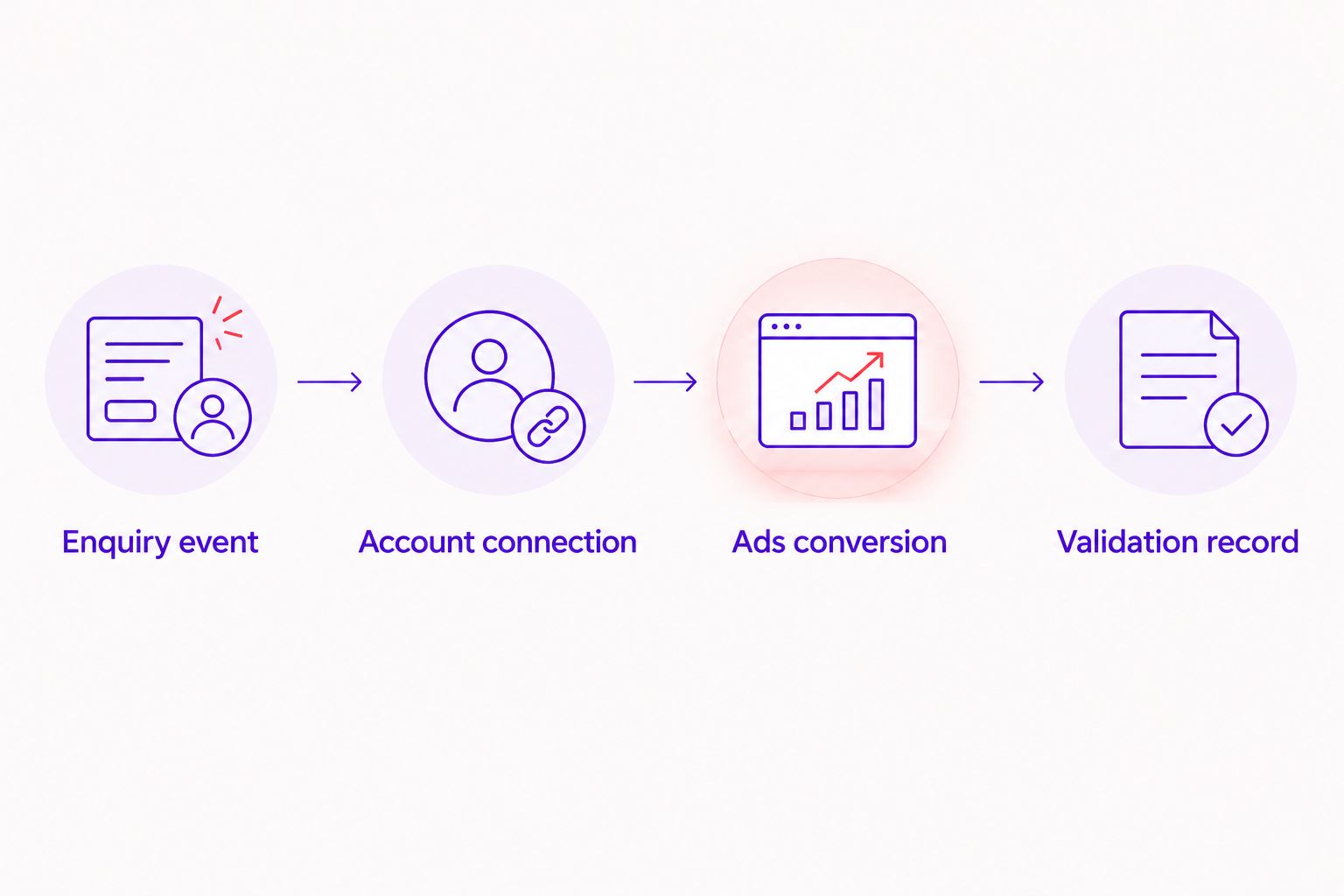
Configuration unit: Your enquiry event
The first task is defining the business outcome, not linking accounts. For a service business, use a successful enquiry submission that the website can distinguish from a failed attempt.
- Write the acceptance rule. Specify what must happen before the event fires: the form succeeds, a confirmation appears or a dedicated confirmation page loads. Do not use a submit-button click if validation can still fail.
- Implement the event. Use the website's form-success behaviour or a Google Tag Manager event tag. A descriptive event such as
generate_leadmakes the purpose clear; document the trigger alongside the event name. - Test the event. Open GA4 DebugView with debug mode enabled on the testing device. Submit the form successfully and confirm the event appears. Then attempt an invalid submission and confirm that it does not produce the same success event.
- Mark the outcome. In GA4 Admin, open Events under Data display and mark the intended event as a key event. Check the event name carefully rather than selecting every form-related event.
Expected result: A successful submission produces 1 intended lead event, while an unsuccessful attempt produces none. Refresh the confirmation page and repeat the test to check for accidental refiring.
A confirmation-page trigger is straightforward, but it needs protection against repeat visits being treated as new submissions. A form-success trigger follows the actual submission, but it needs a reliable signal from the form implementation. Ask your developer which signal the website provides before selecting the method.
Configuration unit: Your account connection
The account link connects Analytics and advertising data. Auto-tagging preserves Google Ads click information in the landing-page visit, provided the website does not strip it away.
- Link the correct accounts. In GA4 Admin, open Google Ads links under Product links. Select Link, then Choose Google Ads accounts. Choose the advertising account that runs the campaigns, confirm the selection and continue with Next.
- Review the connection settings. Check Enable auto-tagging. Review the personalised advertising setting against your consent requirements, then complete the link with Submit.
- Check the landing-page journey. Verify that redirects preserve the
gclidquery parameter used by Google Ads auto-tagging. Include any redirect between the advertised URL and the final landing page in this check. - Check cross-domain journeys. If the enquiry finishes on another domain, review GA4 cross-domain measurement and confirm that the tracking implementation covers the full journey.
Expected result: The intended Google Ads account appears in GA4's linked accounts, and the landing-page journey preserves advertising click information.
Account linking does not override consent choices. In a 2026 tracking scope, document how the website's consent setup controls Analytics and advertising tags. Assign that work to someone who understands the implementation and the business's privacy requirements.
Configuration unit: Your Google Ads conversion
Turn the selected GA4 key event into a Google Ads conversion action. Do not import every available event just because the account connection exposes it.
- Open conversion management. In Google Ads, open Goals, then Conversions and Summary. Start the conversion-action setup and choose the linked Google Analytics 4 property as the data source. The setup route depends on the account's conversion configuration; select the existing GA4 event rather than installing another tag for the same outcome.
- Choose the enquiry event. Select the key event that represents the successful submission. Give the conversion action a readable name that distinguishes it from contact clicks, calls or other outcomes.
- Review counting and optimisation. For lead generation, One counts one conversion per ad interaction for that conversion action. Use Primary for an outcome that should guide bidding, and Secondary for an observation-only action.
- Review campaign goals. Check whether the campaign uses account-default goals or campaign-specific goals. Confirm that the selected goal contains the intended primary enquiry action, not a duplicate or a weaker engagement event.
Expected result: Google Ads contains the intended GA4-based conversion action, with counting and goal settings that match the enquiry definition.
For the 2026 measurement baseline, record the conversion name, source, counting setting and primary or secondary status. A later change to any of these settings can change how you interpret performance, even when the website looks unchanged.
Configuration unit: Your validation record
A visible event is evidence that the website signal works. It is not, by itself, proof that Google Ads has attributed a conversion to an advertising interaction.
- Run a controlled submission. Complete the enquiry journey with a recognisable test enquiry in your sales system. Confirm the success event in GA4 and check that the form actually delivered the enquiry.
- Check for duplicate signals. Inspect whether the website sends the success event through both hard-coded tracking and Google Tag Manager. Also check for an existing Google Ads conversion action measuring the same outcome.
- Inspect reporting separately. Check the conversion action's status in Google Ads and allow for reporting processing. A direct test visit does not demonstrate Google Ads attribution because it has no qualifying ad interaction.
- Save the handover evidence. Record the event name, trigger rule, linked property, conversion action and test result. Identify the person responsible for rechecking tracking after website changes.
Expected result: You have evidence of the website event, the account connection and the conversion configuration, with a clear distinction between event testing and advertising attribution.
Use 3 separate checks: submission delivery, GA4 event firing and Google Ads conversion configuration. Passing one does not prove the others work. This sequence prevents an apparently successful tracking test from hiding a broken enquiry form.
Variant: Measure qualified enquiries after submission
A completed form measures an enquiry, not its commercial quality. If your sales team records which enquiries meet the project brief, add a separate qualified-lead outcome rather than renaming the original form event.
Keep the website enquiry action intact. Define qualification in business terms, such as a confirmed service requirement, then assess an offline conversion setup that connects the sales outcome to the advertising interaction. That workflow requires appropriate identifiers, consent controls and a documented process outside the basic GA4 import.
Best for: Brands whose enquiry forms attract both suitable projects and requests outside their scope. The benefit is a closer connection between advertising and sales quality; the limitation is that reliable sales records become part of the measurement system.
Do not make a qualified-lead action primary until the qualification process and conversion delivery are dependable. Preserve the original enquiry measure so you can identify where the journey loses suitable prospects.
Which conversion route fits your brief?
| Measurement option | Best for | Main benefit | Main limitation |
|---|---|---|---|
| GA4-based Google Ads conversion | Teams already measuring website outcomes in GA4 | Reuses a defined website event across analytics and advertising | Requires correct event setup and account linking |
| Native Google Ads website conversion | Teams commissioning advertising-specific measurement | Creates a conversion directly within the advertising setup | Needs separate implementation and duplicate-counting checks |
| Offline qualified-lead conversion | Teams with dependable sales qualification records | Measures an outcome beyond the website submission | Requires a maintained connection between sales records and advertising |
Choose the route that matches the outcome, not the longest feature list. These approaches can coexist, but the same enquiry should not become multiple primary conversions simply because several tracking methods record it.
Troubleshooting
- The GA4 property is missing from conversion setup. Check the Google Ads link, the selected account and your permissions. Verify the property ID rather than relying on similar property names.
- The event appears more than once per submission. Check for duplicate tags, multiple triggers and confirmation-page refreshes. Keep one implementation responsible for sending the intended success event.
- GA4 records events but Google Ads shows no attributed conversions. Separate event delivery from attribution. Check for a qualifying advertising interaction, preserved click information, the conversion action's status and reporting processing.
- Conversions increase after importing the GA4 event. Inspect whether both the existing Google Ads action and the imported action are primary for the same outcome. Keep only the intended action in the campaign's bidding goal.
- Tracking stops after a website update. Recheck form-success behaviour, confirmation URLs, tag publishing and consent settings. A redesign can change the signal that previously triggered the event.
For 2026 reporting, annotate tracking changes alongside campaign changes. Otherwise, a measurement change can be mistaken for a change in lead performance.
Customize your workflow
Commission the tracking work as a defined deliverable, not an unspecified addition to campaign management. Ask the agency to list the forms, domains, events and conversion actions included, plus the evidence it will provide at handover.
Scope expands when the journey includes embedded forms, external booking platforms, multiple domains or sales-system qualification. Those are implementation requirements. Put them in the proposal before approving the project.
Ask these questions before hiring:
- Which action will guide bidding, and why?
- Who owns the Google Ads account, GA4 property and tag container?
- How will you prove a failed form does not count as a lead?
- How will you prevent duplicate conversion actions?
- Who will revalidate tracking after website or form changes?
CreativHeads' website design and digital marketing services fit a brief that connects page experience with campaign measurement. Require a written tracking scope and acceptance checks; having one agency does not replace clear deliverables.
Define your tracking project
Bring your website journey, campaign goals and enquiry requirements into one project brief.
FAQ
How do I set up Google Ads to GA4 conversion tracking?
Define and test a website event, mark it as a GA4 key event, link the Google Ads account and create an Ads conversion from that event. Then review counting, primary or secondary status and campaign goals.
Does linking Google Ads and GA4 automatically track conversions?
No. Account linking connects the platforms, but you must still create the intended conversion action and configure the campaign’s goals.
Should I track a contact-button click or a completed enquiry?
Use a completed enquiry as the primary lead outcome when the website provides a reliable success signal. Keep contact-button clicks separate because they do not prove a submission succeeded.
Is GA4 conversion tracking better than the Google Ads tag?
Neither route is best for every setup. GA4-based conversions reuse Analytics events, while native Google Ads conversions provide an advertising-specific implementation; choose based on your measurement requirements and prevent duplicate counting.
Why does GA4 show an event but Google Ads shows no conversion?
A GA4 event does not automatically represent an Ads-attributed conversion. Check the conversion setup, qualifying ad interaction, click-information preservation and reporting processing.
What is the difference between primary and secondary conversions?
Primary conversion actions can guide bidding when included in the campaign’s selected goals; secondary actions are generally for observation. Custom goals can include secondary actions in bidding, so review the campaign’s actual goal configuration.
What should an agency hand over after conversion tracking setup?
The agency should provide event definitions, trigger rules, account-link details, conversion settings and validation evidence. The handover should also identify who owns the accounts and who maintains tracking after website changes.
One last thing
A conversion can fire correctly while the enquiry never reaches your team. Include a real submission-delivery check in the acceptance test, not just a tracking screenshot.
Make that part of every 2026 website and campaign handover. Measurement is only useful when the recorded outcome matches a business action you can verify.
Related guides