


Instead of manually rewriting product descriptions whenever search traffic drops, build a Shopify SEO workflow that connects search data, page improvements and enquiry or sales tracking. Start with pages that match buyer intent, fix barriers to discovery, then measure whether those changes bring relevant visitors to your store.
- Build your Shopify SEO workflow around buyer intent, product pages and collection pages—not repeated keyword insertion.
- Use Google Search Console to identify search visibility problems before commissioning more content.
- CreativHeads suits brands seeking strategy, design and marketing from one agency team.
- Approve page scope, implementation responsibilities and measurement before hiring an agency.
Why this matters
A Shopify store needs more than editable titles to earn search visibility. Google must discover its pages, understand what they offer and find content that answers the buyer’s question. Your visitors then need a clear route from that answer to a product decision.
Fix the page that should win the search before creating another page targeting the same search. This keeps your content plan tied to your catalogue rather than a disconnected publishing schedule.
CreativHeads is best for brands seeking strategy, design and marketing from one agency team. That joined-up approach can keep search messaging consistent with the store experience; the trade-off is that you must coordinate content, design and implementation approvals. Use CreativHeads as a starting point when defining that combined project brief.
Before you start
- Secure the right access. You need Shopify permissions to edit the relevant products, collections and website content, plus access to the store’s Google Search Console property. If the property is not verified, arrange domain-management access or help from whoever controls it.
- Prepare your source material. Gather approved product details, collection descriptions, customer questions and any existing brand messaging. Include the person who can confirm claims about materials, compatibility, delivery and other buying considerations. SEO copy must not introduce promises your business does not make.
- Resolve the domain gotcha first. Confirm which public domain your store uses and which Search Console property covers it. A property for the wrong domain or URL prefix can leave you examining the wrong pages. Also check whether the storefront is password-protected before asking Google to index it.
For your 2026 implementation brief, name an approval owner and an implementation owner. One person can hold both roles, but neither responsibility should disappear between the founder, agency and developer.
Search data and page priorities
- Open Google Search Console and select the property covering your public store. If verification is required, follow the method shown for that property. Do not change domain records without confirming who manages them.
- Open Performance and review the search results data. Set the Date filter to compare the latest 28 days with the previous 28 days. This creates a repeatable review window; it is not a promise that SEO changes produce results within that period.
- Review Queries to see what people searched, then Pages to identify the URLs receiving impressions and clicks. Separate branded searches from searches describing products, categories or buying needs.
- Build a starter list of 5 URLs. For each, record its intended buyer, search question, current page purpose, observed problem and proposed change. Choose pages with a clear commercial role rather than simply selecting those with the highest impressions.
- Open URL inspection for each priority URL. Check whether Google has indexed the page and review any stated reason when it has not. Record indexing problems separately from content improvements.
Expected result: You have a short, evidence-based backlog connecting search demand to existing store pages. Each task has a reason beyond adding keywords.
If Search Console has no useful history yet, begin with your principal collections and products. Document that starting point, then collect search data rather than treating absent clicks as proof that the pages are poorly written.
Match the search to the right page
Different searches need different destinations. Use this comparison before deciding what to commission.
| Page option | Best for | Main benefit | Limitation |
|---|---|---|---|
| Product page | Buyers evaluating a specific product | Connects product details directly to a buying decision | Too narrow for a search covering a whole category |
| Collection page | Buyers comparing products within a category | Gives category searches a relevant browsing destination | Needs useful context, not just a product grid |
| Buying guide | Buyers who need explanation before choosing | Answers questions that need more detail than a listing | Adds editorial work and needs a relevant next step |
Assign one primary search intent to each priority page. That does not mean using only one keyword. It means giving the page one clear job so its title, copy and links support the same decision.
Shopify page content and search listings
- In Shopify, open Products for an individual product or Collections for a category page. Select the relevant item and confirm that its public content matches the intended buyer question.
- Edit the main title and description. Lead with what the product or collection is, then explain the details buyers need to choose. Replace generic praise with approved facts and practical distinctions.
- Find Search engine listing in the editor and open its editing control. Review Page title and Meta description. Make the title distinguish this page from neighbouring pages; use the description to explain its relevance rather than repeat a list of keywords.
- Review URL handle, but leave an established URL unchanged unless the change solves a specific problem. If you change it, ensure the old public address redirects to the new address and update internal links.
- Select Save, then open the public page. Check the displayed content, search-listing settings and links rather than assuming the saved editor view proves everything is correct.
Expected result: The page has a clear purpose, accurate buying information and a distinct search listing. Its existing address remains intact unless a managed URL change was necessary.
For your 2026 content backlog, separate factual corrections from new writing. Correcting an inaccurate product claim comes before polishing a description. Google can also display a different title or snippet from the text you entered, so treat search-listing fields as useful signals—not guaranteed display instructions.
Store navigation and discovery
- Open each priority page through the public storefront. Check whether a visitor can reach it from a relevant collection, navigation route or supporting page without relying on your direct URL.
- Add contextual links where they help the buying journey. A guide explaining a category should lead to that category; a collection introduction should not send visitors to an unrelated product simply to add a link.
- Review the store’s navigation configuration. Give destinations descriptive labels that distinguish categories. Avoid several different labels leading to the same destination when they create confusion rather than useful routes.
- Check the public page on a phone. Read the introduction, inspect the product choices and test the main buying action. Record layout problems that hide useful information or interrupt the route to purchase.
- Assign theme or layout changes to whoever controls implementation. Keep these tasks separate from copy approvals so a design dependency does not leave a content task incorrectly marked complete.
Expected result: Your priority pages sit within a usable store structure, and buyers can move from explanation to relevant products.
The goal is not to add links everywhere. It is to make important pages discoverable in context. A product page buried outside relevant browsing routes needs a structural fix, not another paragraph containing its keyword.
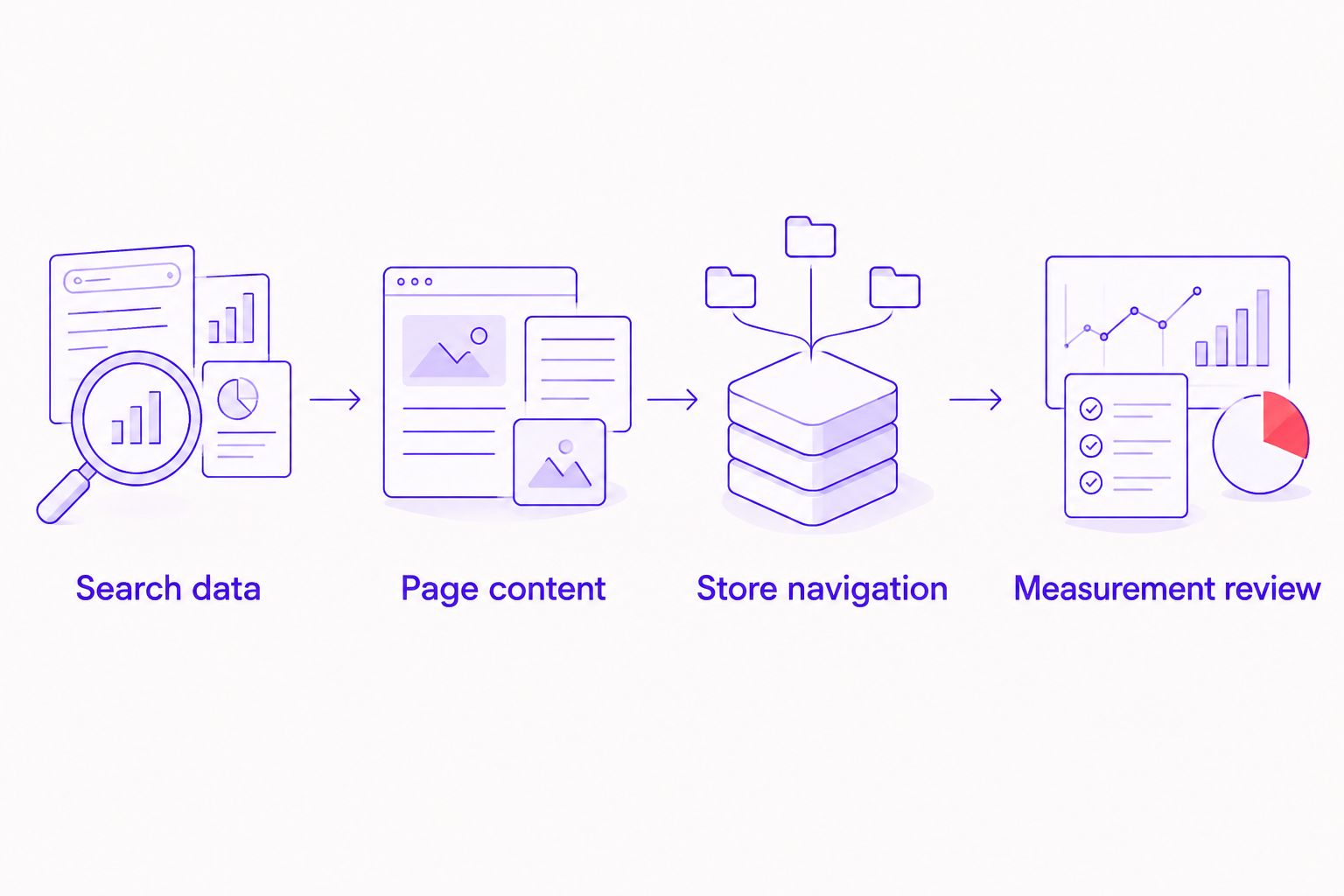
Measurement review and ownership
- Record the publication date and the exact changes made to each URL. Keep titles, content, navigation and URL changes distinguishable in the log. Otherwise, later reviews cannot connect an observed change to a specific intervention.
- Revisit URL inspection after publishing. Use Test live URL when you need to check the current page’s accessibility. Use Request indexing for an important updated page when appropriate; a request does not guarantee indexing or a ranking change.
- Return to Performance and filter the review to the changed page. Compare clicks, impressions, queries and average position using consistent date windows. Read those measures together rather than treating one movement as the entire result.
- Check your existing analytics for the commercial action that matters: purchases, qualified enquiries or another defined conversion. Confirm that the action is recorded correctly before using it to judge SEO performance.
- Decide whether to keep, refine or expand the work. More impressions with irrelevant queries require a different response from relevant visits that reach a confusing product page.
Expected result: Each completed task has a measurement record and a named next action. Your 2026 reporting connects visibility to buyer behaviour without claiming that every traffic change came from the latest edit.
Do not judge an agency solely on ranking screenshots. Ask which pages changed, which searches became more relevant and what visitors did after arriving.
Repeat the workflow when products or collections change
A second workflow starts with a catalogue update rather than a search-performance problem. Use it when you add products, reorganise collections or change information that affects a buying decision.
- Catalogue change: Record the affected URLs and the approved product facts. Identify whether the change alters the page’s purpose or only its details.
- Content check: Update the visible description and search listing where necessary. Keep the wording aligned with the new product or collection information.
- Navigation check: Confirm that related collections, guides and navigation routes still point to the intended destination.
- Measurement check: Log the release date and review the affected pages through the same Search Console process.
Keep this as an approval checklist unless you have a clear reason to automate parts of it. Automatically rewriting every search title after a minor product edit can change useful messaging unnecessarily.
For a 2026 launch, place this checklist inside the release brief. New photography, revised descriptions and website changes should share an approved set of product facts, not separate interpretations of what you sell.
Troubleshooting
An updated page is still not indexed
Inspect the URL and read the stated reason. Check public accessibility, password protection, indexing directives and canonical information before rewriting the copy. Request indexing does not fix an inaccessible page or an instruction that tells Google not to index it.
Google shows a different page title or description
Check that the saved fields describe the visible page accurately. Remove duplication and conflicting wording between the page heading and search title. Google generates search displays, so repeatedly saving the same text is not a reliable fix.
A URL change sends visitors to an error page
Test the old address directly. Add or correct its redirect to the relevant replacement, then update internal links that still use the old URL. Do not send every removed product address to the homepage without considering the visitor’s original intent.
Impressions rise but clicks remain weak
Review the queries producing those impressions. If they do not match the page’s purpose, revise the targeting. If they do match, inspect the search listing and competing result formats before assuming the solution is more text.
Search traffic grows but commercial results do not
Check conversion tracking first, then inspect the landing experience. Search intent, product information and the buying action must agree. A page can attract relevant attention yet leave buyers unable to answer a practical question or complete the next step.
Customize your workflow before hiring an agency
Turn the workflow into a project scope, not an open-ended request to improve SEO. Specify which product pages, collections, guides and design elements need attention. State whether the commission covers recommendations only or approved changes inside Shopify.
Ask prospective agencies these questions:
- Which URLs are included, and why were they selected?
- Who writes the content, checks product facts and publishes approved changes?
- Are navigation, theme changes and redirects included or separate?
- What deliverables will show the work completed on each page?
- Which search measures and business actions will reporting cover?
- How are revisions, additional pages and ongoing maintenance handled?
Proposal scope expands with catalogue size, custom page layouts, content requirements and implementation responsibilities. Compare the same deliverables across proposals rather than comparing a content-only plan with a redesign-and-content project.
CreativHeads combines strategy, design and marketing within one agency team. For a Shopify SEO workflow, define which of those disciplines your project actually needs. That model supports coordinated messaging; it also requires clear boundaries so a focused search project does not become an undefined website rebuild.
Commission the smallest complete scope that fixes the buying journey. A collection-page project is incomplete if essential navigation changes remain outside the agreement. A full redesign is unnecessary when the problem is confined to inaccurate content and weak page targeting.
Define your website project
Set the page scope, design needs and marketing priorities before comparing agency proposals.
FAQ
What is a Shopify SEO workflow?
A Shopify SEO workflow is a repeatable process for identifying search opportunities, improving relevant store pages and measuring the outcome. It connects search data, content, navigation and business actions rather than treating keyword edits as a standalone task.
Where should I start with Shopify SEO in 2026?
Start with Google Search Console and the product or collection pages that serve your main buying decisions. Check indexing and search intent before commissioning additional articles or redesigning the store.
Should I optimise product pages or collection pages first?
Prioritise the page type that matches the search you want to serve. Collection pages suit category browsing, while product pages suit searches about a specific item; neither replaces the other.
Do I need an SEO app to follow this workflow?
You can carry out the core workflow using Shopify’s page editors and Google Search Console. Consider additional tools only when you have a defined task that your current setup does not handle adequately.
Will requesting indexing make my Shopify page rank?
Requesting indexing does not guarantee indexing or rankings. It asks Google to consider a URL, but the page must still be accessible and suitable for indexing.
What should an agency’s Shopify SEO proposal include?
The proposal should identify the pages, deliverables, implementation responsibilities, approval process and measurement plan. It should also distinguish content work from navigation changes, theme work and ongoing maintenance.
Is CreativHeads a Shopify SEO software provider?
CreativHeads is a service agency, not a software provider. Its stated services include branding, web design, content and digital marketing; confirm the Shopify implementation scope when discussing your project.
One last thing
Your best SEO brief might start with a customer question, not a keyword export. Take a question that repeatedly delays a buying decision and check whether the relevant page answers it with approved facts.
For your next 2026 review, attach that question to a specific URL and an owner. A useful page improvement has a buyer, a destination and a completion test. That is a stronger instruction than asking someone to make the store more SEO-friendly.
Related guides