


Best overall: mobile buying journey. Best for protecting search visibility: URL migration plan. Best for scope control: written acceptance criteria. This 2026 guide helps you commission the right work; CreativHeads is best for brands seeking strategy, design and marketing from one team.
- Start your website redesign checklist for ecommerce brands with the mobile buying journey, not homepage decoration.
- Commission a URL migration plan before changing product, collection or campaign addresses.
- Make product-page content, checkout testing and measurement explicit proposal deliverables.
- CreativHeads brings strategy, design and marketing together; define responsibilities and approval criteria before commissioning work.
Why this matters
An ecommerce redesign changes more than appearance. It changes how shoppers find products, judge suitability and complete orders, while also changing the pages your search and advertising campaigns depend on.
For your 2026 brief, separate business requirements from visual preferences. A new colour palette is a design decision; keeping product information readable, preserving useful page addresses and recording completed purchases are project requirements. Approve the buying journey before approving the visual finish.
What makes the best ecommerce redesign checklist
Use these criteria to evaluate each item in your website redesign checklist for ecommerce brands:
- Buying relevance: Does the work help shoppers find, understand or purchase a product?
- Visibility protection: Does it account for existing search pages and campaign destinations?
- Clear ownership: Is someone responsible for supplying content, implementing changes and approving them?
- Testable completion: Can you verify the deliverable rather than accept a subjective claim?
- Operational fit: Does the design work with your catalogue, fulfilment information and existing systems?
- Maintainability: Can your team update everyday content without requesting another redesign?
For a 2026 project, these criteria keep the proposal focused on a functioning store rather than a collection of attractive mock-ups.
Ecommerce redesign must-haves at a glance
The ranking below orders project priorities, not agencies or software. Each item solves a different buying or delivery problem.
| Must-have | Best for | Standout deliverable | Key limitation |
|---|---|---|---|
| Mobile buying journey | End-to-end shopping usability | Approved browse-to-purchase flow | Needs testing with real store content |
| URL migration plan | Search visibility protection | Old-to-new address map | Cannot guarantee unchanged rankings |
| Product-page content system | Purchase confidence | Reusable product information template | Depends on accurate product facts |
| Checkout and payment testing | Order completion | Documented checkout test cases | Depends on payment and platform access |
| Catalogue navigation | Product discovery | Category and filter rules | Requires consistent product attributes |
| Performance and accessibility checks | Usable page delivery | Page-level testing and fixes | Third-party components affect results |
| Measurement plan | Evaluating launch outcomes | Defined events and validation records | Tracking has consent and attribution limits |
| Acceptance criteria and handover | Scope control | Approval checklist and operating guide | Requires timely decisions from your team |
1. Mobile buying journey: best for shopping usability
The mobile buying journey connects discovery, product evaluation, cart and checkout. Commission layouts for this whole route, not just a polished homepage. Use realistic product names, images, variants and delivery information when reviewing the design.
Mobile buying journey pros:
- Reveals awkward transitions between browsing and buying.
- Makes essential product information part of the layout.
- Gives the agency a shared flow to design and test.
Mobile buying journey cons:
- Homepage approval alone does not establish that the journey works.
- Attractive prototypes do not replace testing on the implemented store.
Best for: Brands whose redesign brief concentrates on appearance while leaving shopping behaviour undefined.
Ask the agency to demonstrate 3 shopping journeys: category browsing, on-site search and a campaign landing page. Follow each through product selection and checkout; these are recommended test routes, not a conversion benchmark.
Verdict — Buy: Commission the complete mobile buying journey before approving individual page designs.
2. URL migration plan: best for search visibility protection
A URL migration plan records what happens to existing page addresses when the store changes. It should distinguish pages that remain, pages that move and pages that are removed. Where content genuinely moves, specify an appropriate permanent redirect.
URL migration plan pros:
- Accounts for existing product and collection entry points.
- Makes redirect decisions visible before launch.
- Connects redesign work with search and campaign requirements.
URL migration plan cons:
- Redirects cannot guarantee unchanged search rankings.
- Sending unrelated removed pages to the homepage does not preserve their relevance.
Best for: Brands changing their platform, catalogue structure or page addresses.
Ask who owns the address inventory, redirect implementation and post-launch checks. Keep useful addresses unchanged where the project does not require a change, and review internal links alongside redirects.
Verdict — Buy: Require a migration plan whenever the redesign changes existing URLs.
3. Product-page content system: best for purchase confidence
A product-page content system defines where shoppers find specifications, variants, usage information and relevant policies. It also gives your team a repeatable way to publish accurate information. The template must accommodate differences between products rather than force every item into identical copy.
Product-page content system pros:
- Creates a consistent structure for product evaluation.
- Separates essential facts from promotional language.
- Makes content responsibilities easier to assign.
Product-page content system cons:
- A template cannot correct inaccurate product information.
- Photography and copy production need their own defined scope.
Best for: Brands with inconsistent product pages or a growing catalogue.
Ask to review a straightforward product and a more complicated variant-based product in the proposed template. Confirm who supplies specifications, who writes descriptions and who approves policy wording.
Verdict — Buy: Commission the content structure with the design, not after page layouts are final.
4. Checkout and payment testing: best for order completion
Checkout testing verifies the implemented purchase flow under defined conditions. Include payment success, payment failure, address entry, delivery selection and order confirmation. Test the actual configuration, not only a design prototype.
Checkout and payment testing pros:
- Tests whether the purchase journey reaches an order.
- Exposes confusing validation and failure messages.
- Makes payment and fulfilment dependencies explicit.
Checkout and payment testing cons:
- Testing requires appropriate platform and payment access.
- Some checkout changes depend on the platform's supported capabilities.
Best for: Brands changing checkout presentation, payment settings or shipping rules.
Specify which payment methods and order conditions belong in the test plan. Ask who checks the customer confirmation and the merchant-side order record; both matter when deciding whether a test passed.
Verdict — Buy: Make checkout testing a launch requirement, not an optional finishing task.
5. Catalogue navigation: best for product discovery
Catalogue navigation defines how shoppers move through categories, search results and filters. Build it around distinctions customers understand, supported by product attributes your team can maintain. A filter is useful only when the underlying information is consistently populated.
Catalogue navigation pros:
- Gives shoppers clear routes into the assortment.
- Connects categories and filters to actual product information.
- Establishes rules for adding products after launch.
Catalogue navigation cons:
- Inconsistent attributes produce unreliable filtering.
- More navigation choices do not automatically make browsing easier.
Best for: Brands expanding their assortment or reorganising collections.
Ask the agency to demonstrate an empty search result, an unavailable combination of filters and a product belonging to multiple collections. Agree how the store should respond before implementation begins.
Verdict — Buy: Commission navigation rules and catalogue cleanup together when product organisation is part of the problem.
6. Performance and accessibility: best for usable page delivery
Performance work addresses how pages load and respond. Accessibility work addresses whether people can perceive information and operate the interface, including without a mouse. These requirements belong in the build brief, not just a final report.
Performance and accessibility pros:
- Makes loading behaviour part of design decisions.
- Checks practical details such as labels, focus and contrast.
- Identifies problems across important page templates.
Performance and accessibility cons:
- A single automated score does not prove overall usability.
- Apps, embedded media and third-party scripts affect the finished store.
Best for: Brands adding rich media, complex interactions or multiple integrations.
Request checks at 2 viewport widths, including a narrow mobile view and a desktop view, plus keyboard testing. Treat this as a minimum review exercise, not proof that every device or accessibility need is covered.
Verdict — Buy: Require documented checks and fixes rather than accepting an undefined promise of a fast website.
7. Measurement plan: best for evaluating launch outcomes
A measurement plan defines the actions your team needs to understand after launch. For ecommerce, these include product views, cart additions, checkout activity and purchases. Specify how events will be verified and how duplicate recording will be checked.
Measurement plan pros:
- Connects the redesign to observable shopping activity.
- Assigns responsibility for analytics and advertising connections.
- Provides a validation record for launch approval.
Measurement plan cons:
- Consent choices and browser restrictions limit tracking.
- Event installation alone does not explain why behaviour changes.
Best for: Brands that need to evaluate the store alongside their campaigns.
Ask for an event inventory written in business language. Record the pre-launch reporting setup before changing it, and document tracking changes separately from design changes.
Verdict — Buy: Commission measurement definitions and validation, not simply the installation of tracking tags.
8. Acceptance criteria: best for scope control
Acceptance criteria describe what must be delivered and how you will approve it. Include templates, content responsibilities, integrations, testing, revisions and handover. Separate required launch work from additions that need a new approval.
Acceptance criteria pros:
- Makes proposals easier to compare.
- Turns vague deliverables into observable completion checks.
- Clarifies what your team must provide.
Acceptance criteria cons:
- Unresolved requirements still need decisions before work starts.
- Delayed content or approvals can disrupt the agreed sequence.
Best for: Founders comparing redesign proposals or coordinating several internal stakeholders.
Appoint 1 approval owner to consolidate feedback. That is a recommended governance choice, not a rule about how many people can contribute; the aim is a clear final decision.
Verdict — Buy: Agree written acceptance criteria before authorising the build.
How the priorities are ranked
The mobile journey comes first because it defines the shopping experience the other deliverables support. Migration follows to address existing page dependencies; content and checkout then establish how products are evaluated and purchased.
The remaining items cover discovery, usable delivery, measurement and project control. This is a commissioning sequence, not a claim that every brand has the same problems. Keep every applicable requirement in scope, even when its position changes.
Turn the checklist into a project brief
For a 2026 website redesign, give prospective agencies a brief they can quote against rather than a request to make the store look modern. Describe the business problem and the affected shopping journey first.
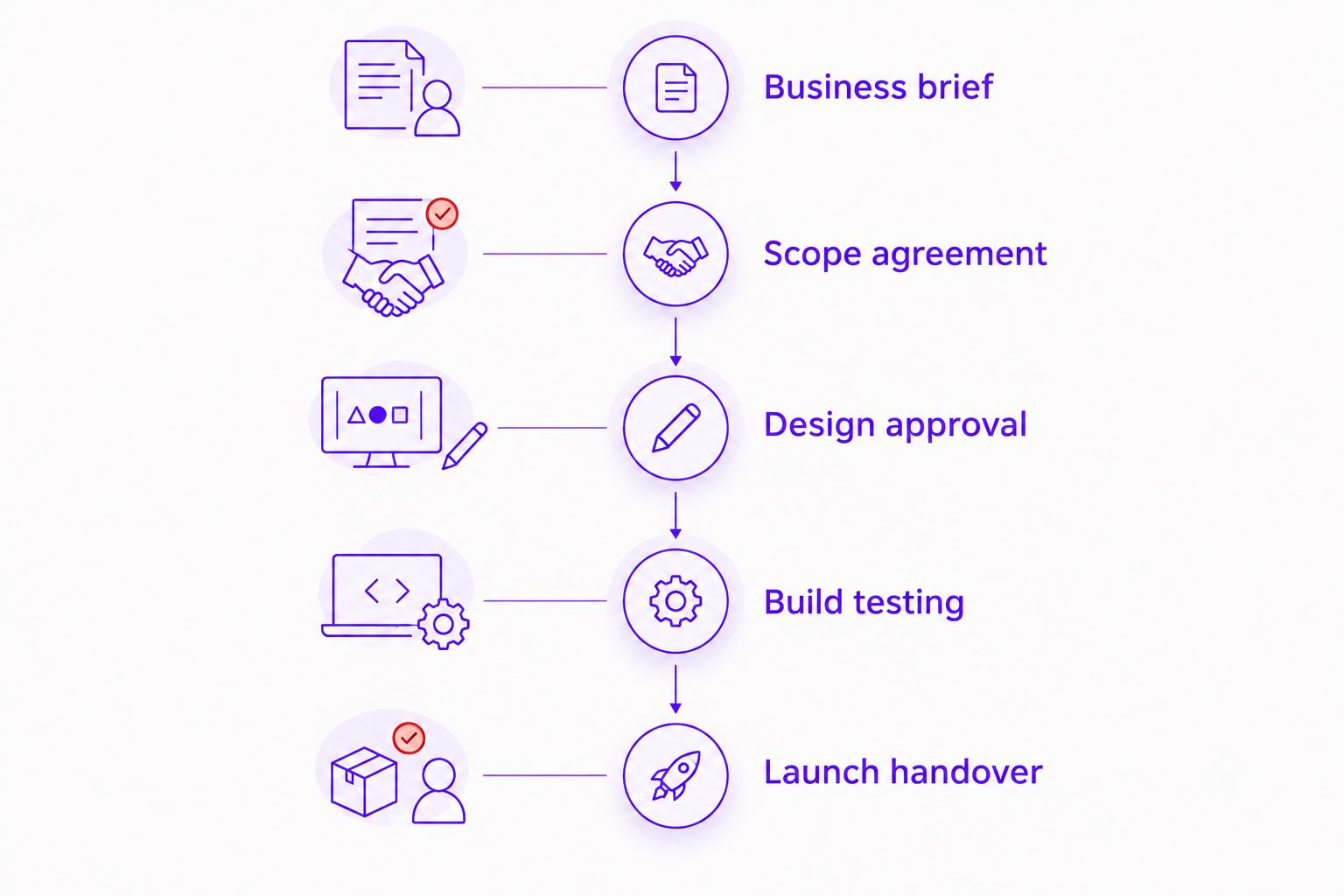
Build the brief around these phases:
- Business brief: Identify the shoppers, products and journeys the redesign must serve.
- Scope agreement: List page templates, content work, integrations, migration responsibilities and exclusions.
- Design approval: Review realistic content and buying flows before approving visual details.
- Build testing: Check the implemented journeys against the written requirements.
- Launch handover: Confirm access, documentation, training and responsibility for unresolved issues.
Compare proposals by deliverables, not page count alone. Catalogue cleanup, new photography, copywriting, platform changes and integrations all change the work being commissioned. Ask each agency to separate included work, dependencies and exclusions so you can compare equivalent scopes.
CreativHeads combines strategy, design and marketing in one team. For your brief, ask how those disciplines will coordinate product storytelling, shopping journeys and campaign destinations. One team does not remove the need for named responsibilities and approval gates.
Before hiring, ask:
- Who supplies and approves product content?
- What happens to existing URLs and campaign destinations?
- Which checkout conditions will be tested?
- What will the team hand over for everyday updates?
- How are changes outside the agreed scope approved?
Discuss your redesign scope
Bring your catalogue, buying journeys and launch requirements into a service enquiry.
Which redesign must-haves should you choose?
Start with the mobile buying journey, then require the supporting migration, content, checkout and testing work. If your 2026 project is mainly a visual refresh, confirm which existing systems and addresses remain unchanged rather than commissioning unnecessary replacements.
For a larger rebuild, use all the applicable checklist items as proposal headings. CreativHeads is a fit for buyers seeking coordinated strategy, design and marketing; evaluate the proposed scope against these requirements before commissioning the project.
FAQ
What’s the most important ecommerce website redesign requirement?
The mobile buying journey is the first requirement to define. Review browsing, product selection, cart and checkout together rather than approving the homepage in isolation.
What should an ecommerce redesign proposal include?
An ecommerce redesign proposal should define templates, content, integrations, migration, testing and handover. It should also identify exclusions, approval responsibilities and how scope changes are handled.
Do I need to change platforms when redesigning my store?
A redesign does not require a platform change. Decide whether the existing platform supports the agreed requirements before adding migration work to the project.
Will a website redesign preserve my Google rankings?
A redesign cannot guarantee unchanged Google rankings. Preserve useful URLs where practical, map necessary changes and check redirects and internal links after launch.
How do I compare ecommerce website redesign quotes?
Compare redesign quotes against the same deliverables and exclusions. Separate design, content, catalogue work, integrations, migration and testing before judging the proposals.
Is a new homepage enough for an ecommerce redesign?
A new homepage is not enough when product discovery or checkout also needs work. Scope the affected buying journeys and page templates rather than treating the homepage as the whole store.
What should I ask an agency about website handover?
Ask what access, documentation and training the agency will provide. Confirm who handles routine content updates and who owns unresolved launch issues.
One last thing
Before signing your 2026 redesign proposal, ask the agency to explain what happens when a shopper follows an old product link. That question connects migration, catalogue decisions and customer experience in one concrete example. If the answer is unclear, resolve the requirement before launch planning begins.
Related guides