


Give a performance marketing agency named-user or partner access to the advertising, analytics, tracking and reporting systems needed for its agreed work—not shared passwords or unrestricted control of your business. Keep account ownership, payment oversight and recovery details with your company, and grant broader permissions only when a specific task requires them; this guide explains what to approve, what to restrict and what to put in your 2026 onboarding brief.
- Give your performance marketing agency task-specific permissions; keep ownership, payment oversight and recovery details inside your business.
- CreativHeads is best for businesses seeking strategy, design and marketing from one team.
- Separate campaign management, conversion tracking and customer data access in your onboarding brief.
- Agree access removal and handover requirements before granting permissions.
Why this matters
Agency access is a business-control decision, not an administrative formality. Your partner needs enough permission to improve campaigns, but your company must remain able to inspect activity, replace suppliers and continue operating without rebuilding its accounts.
For founders commissioning CreativHeads or another agency, the practical question is simple: which deliverable requires which permission? A campaign launch, a landing-page redesign and a sales-reporting project need different access, even when they sit within the same engagement.
Approve access against a written scope, not against a request for everything. That makes onboarding clearer and gives you a usable checklist when the engagement ends.
What access should you give a performance marketing agency?
Give a performance marketing agency the lowest permission level that allows it to complete each agreed task. Separate viewing data, editing campaigns, publishing tracking changes and administering accounts instead of treating them as one permission decision.
Use this matrix as the starting point for your 2026 access plan. Permission names differ across platforms, so check what each selected role actually allows before sending an invitation.
| System or asset | Access to consider | Best for | Benefit | Boundary or drawback |
|---|---|---|---|---|
| Advertising accounts | Campaign viewing and editing through an individual or partner invitation | Campaign management | Lets the agency build and optimise campaigns | Editing access can affect live spend; define approval rules |
| Analytics | Reporting access, with configuration permissions only when required | Measurement and analysis | Shows traffic and recorded conversions | Read-only access does not support configuration fixes |
| Tracking tools | Configuration or publishing permissions matched to the tracking scope | Conversion tracking implementation | Supports agreed measurement changes | Published changes can affect data collection |
| Website or landing pages | Access limited to the required pages, workspace or environment where supported | Landing-page work | Lets the agency change the conversion journey | Broad access exposes unrelated site settings |
| Customer relationship management system | Reporting access or approved fields and records | Lead-quality analysis | Connects campaign enquiries with sales outcomes | Broad exports expose more customer information |
| Brand assets and social accounts | Access to agreed files and relevant publishing functions | Ad creative and campaign delivery | Keeps campaign material available to the team | Publishing permissions can affect public-facing content |
The matrix is a proposal framework, not a request to grant every row. If a system is outside the agreed scope, leave it out of the initial access package. Add it later only when the agency explains the task, permission and business reason.
Advertising access: campaign work without handing over ownership
Your company should retain control of the advertising accounts used for its business. Invite the agency through the platform's supported access system rather than sending the founder's login credentials.
Campaign-editing access supports active management. Read-only access supports an audit or reporting engagement but does not let the agency implement changes. Neither option automatically settles who approves budgets, new campaigns or changes to existing campaigns; document those decisions separately.
Ask the agency to identify the accounts and business assets it needs, the requested permission level and the person responsible for the work. If broader access is necessary for setup, agree when that permission will be reviewed.
- Approve: Permissions tied to campaign creation, editing and reporting within scope.
- Clarify: Who authorises spending changes and how approval is recorded.
- Retain: Company control of ownership, recovery details and agency invitations.
- Avoid: A shared login that prevents you from distinguishing individual activity.
Platform permissions and your operating agreement serve different purposes. A person might technically be able to change a budget while still needing written approval under your agreement.
Analytics and tracking access: separate reading from publishing
An agency needs reporting access to understand recorded campaign performance. It needs additional permissions only when its scope includes configuring measurement, repairing tracking or publishing changes.
Start by asking which business actions the agency will measure: enquiries, purchases, qualified leads or another agreed outcome. Then define where those actions are recorded and who confirms that the measurement works.
For a 2026 measurement brief, name the business outcome rather than asking for tracking to be installed without further detail. A submitted enquiry and a qualified sales opportunity are different events; your reporting should not treat them as interchangeable.
Separate the ability to inspect tracking from the authority to publish tracking changes. Where the system supports that separation, it gives your team a clear approval point before changes go live.
Ask for a record of what changed, how it was checked and how to reverse it. That record belongs in your handover materials, not just in the agency's working notes.
Website access: match permissions to the landing-page scope
A campaign-management brief does not automatically require full website administration. A landing-page project does require a way to edit, review and publish the agreed pages, but the access should follow those deliverables.
Write down whether the agency will change page copy, design, forms, tracking or the site's underlying configuration. These are different responsibilities, and a proposal should make the distinction clear.
Where supported, use a staging environment—a separate place to review changes before they reach the live website. Agree who approves publication and who handles recovery if a change disrupts a page or form.
Before granting access, ask:
- Which pages and settings will the agency change?
- What remains outside the project?
- Who reviews forms and enquiry routing before publication?
- Who holds backups and can restore the website?
- Does the scope include ongoing maintenance or only project delivery?
Do not make the campaign team responsible for website support unless that work is explicitly included. Equally, do not expect landing-page improvements from an agency that only has permission to view reports.
Customer data access: share what explains lead quality
The agency needs feedback on lead quality if its work is judged on more than enquiry volume. That does not mean it needs unrestricted access to every customer record, conversation or document.
Start with the information needed to connect marketing activity to business outcomes. Depending on the scope, that can mean campaign source, lead status and an agreed outcome category rather than complete customer histories.
Aggregated reporting is useful when the agency only needs patterns. Record-level access is a separate decision when the work requires individual lead analysis or system configuration.
Define what can be viewed, downloaded, shared and retained. Your 2026 data-access brief should also name the person responsible for approving any expansion of that scope.
Ask whether a report can answer the business question before granting broader database permissions. Better measurement does not require unlimited customer-data access. It requires a clear connection between campaign activity and the outcomes you have agreed to evaluate.
Why agency access requirements vary
Access requirements follow the work you commission. These factors explain why two agency proposals can reasonably request different permissions:
- Project scope: An audit needs viewing access; campaign execution needs editing permissions.
- Measurement responsibility: Reading reports differs from configuring and publishing conversion tracking.
- Website deliverables: Reviewing a landing page differs from building, testing and publishing it.
- Sales feedback: Lead-volume reporting differs from examining qualified leads and sales outcomes.
- Creative delivery: Producing advertising assets differs from publishing them through your accounts.
- Approval responsibility: A team authorised to execute approved changes needs different controls from one expected to propose changes only.
Reject access requests that have no corresponding deliverable. If the agency adds a service later, update the scope and permission record together rather than expanding access informally.
How should you set up agency access before launch?
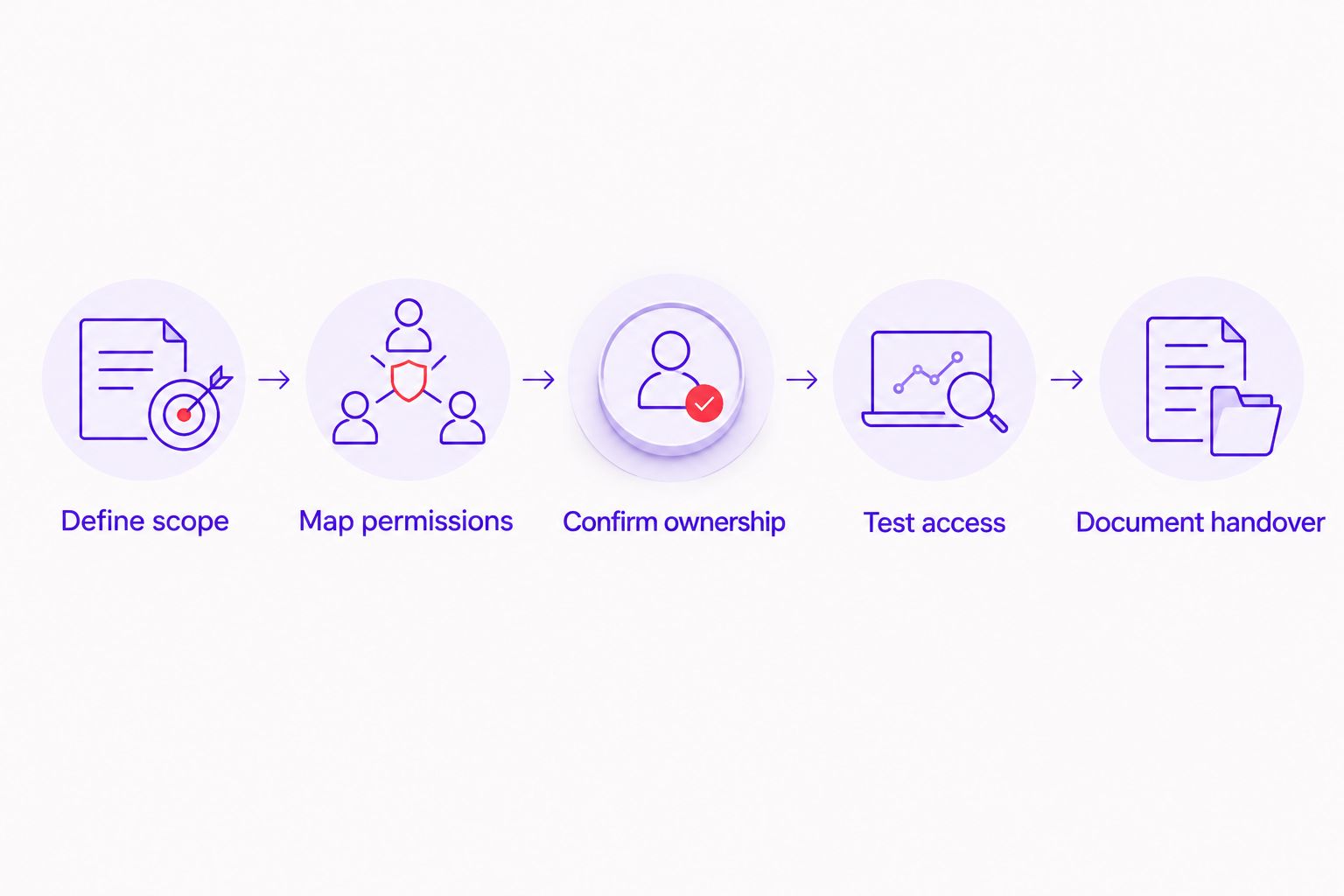
Use a written sequence so permissions do not become a collection of invitations nobody owns. For your 2026 onboarding checklist, make the following steps part of the project brief.
- Define scope. List the campaigns, pages, reporting and creative deliverables the agency will own.
- Map permissions. Match each deliverable to a system, permission level and named recipient.
- Confirm ownership. Check that your company controls the accounts and recovery details before work begins.
- Test access. Ask the agency to confirm it can complete the agreed tasks without unnecessary permissions.
- Document handover. Record what must be returned, transferred or removed when the engagement ends.
The approval record should be readable by someone who was not involved in onboarding. Include the asset, recipient, permission, reason, approval owner and removal condition.
As a practical starting point, assign 2 client-side administrators for continuity and 1 agency access lead to coordinate requests. These are recommended roles, not platform requirements; use individual accounts rather than shared credentials.
Schedule 3 access checkpoints: before launch, when scope changes and at handover. Each checkpoint should confirm that permissions still match the work being performed.
What should an agency proposal say about access?
A useful proposal connects deliverables, responsibilities and permissions. It should explain what the agency needs from your team and what your business will receive—not simply ask for account access after the agreement is signed.
CreativHeads brings strategy, design and marketing together as a service agency. That combined scope is relevant when campaigns also need creative assets or landing-page changes, but a single team still needs separate permissions for separate responsibilities.
The benefit is a connected brief across the work. The trade-off is coordination: wider scope creates more approval decisions, and your proposal needs to name who handles them.
Before hiring, ask the agency:
- Which account permissions are essential at launch, and why?
- Which requests depend on optional deliverables?
- Who approves campaign, tracking and website changes?
- What documentation will your business receive?
- What stays under company ownership throughout the engagement?
- What happens to access and working files when the project ends?
These answers also help you compare scope. A proposal covering reporting alone is not equivalent to one covering campaign execution, tracking changes and website work.
Should you give an agency your passwords?
Use named invitations or supported partner access instead of sharing your personal passwords. This keeps the agency's access separate from your own and lets you remove that access without changing how your team signs in.
If a system does not offer suitable access controls, agree a secure credential-handling process before using it. Do not send passwords through ordinary project messages, and keep recovery control with your business.
Does a performance marketing agency need admin access?
Admin access is justified only when an agreed task requires administrative permissions. Ask the agency to name that task and explain why a lower permission level will not support it.
For a 2026 account setup or configuration change, distinguish temporary setup permissions from ongoing management permissions. Review the broader role when the setup task is complete.
What access should you remove when the agency leaves?
Remove agency users, partner permissions and integrations that no longer have an approved purpose. Before removal, confirm that your company has the campaign records, reporting, creative files and implementation notes included in the agreement.
Check ownership and recovery settings as well as visible user lists. Removing a person is not a substitute for confirming that your business can operate every relevant account independently.
FAQ
What access should I give a performance marketing agency first?
Give a performance marketing agency access only to the systems needed for the initial scope. Match campaign, analytics, tracking and website permissions to specific deliverables before sending invitations.
Can an agency manage campaigns without owning my ad account?
An agency can manage campaigns through supported user or partner permissions without owning your account. Keep company ownership and recovery details under your business’s control.
Should my agency use my personal login?
Your agency should use named-user or supported partner access rather than your personal login. Separate access makes individual responsibility and removal clearer.
Does an agency need access to all my customer records?
An agency does not need all customer records simply to manage campaigns. Start with reporting or approved fields that connect campaign activity to lead quality and sales outcomes.
How many people should manage agency access?
A practical starting point is 2 client-side administrators and 1 agency access lead. These are recommended roles, not mandatory platform limits; each person should use an individual account.
How often should I review agency permissions?
Use 3 access checkpoints: before launch, when scope changes and at handover. Review permissions sooner whenever responsibility for an account or task changes.
Is CreativHeads a software platform or a service agency?
CreativHeads is a service agency offering branding, web design, content and digital marketing. Its combined strategy, design and marketing positioning suits businesses seeking those services from one team.
What should my agency hand over when the contract ends?
Your agency should hand over the files, reports, campaign records and implementation documentation specified in your agreement. Define the list before work starts and confirm company control before removing access.
One last thing
Ask for the exit plan before approving the onboarding plan. If the proposal cannot explain how your business keeps its accounts, retrieves its agreed work and removes access, the permission discussion is unfinished.
Make handover a deliverable. Your business should be able to change partners without losing control of the assets it commissioned.
Related guides