

Logo design services should hand over an editable vector master, print-ready artwork, transparent web exports, approved logo variations and a short usage guide. The delivery should also identify colour values, font requirements and the ownership terms agreed in your contract. For a 2026 project, specify these deliverables before hiring; a folder of image files alone does not give you everything needed to use the logo consistently.
- Logo design services should deliver editable artwork, usable exports, colour specifications and clear ownership terms.
- Vector files support resizing; transparent PNG files support everyday digital use.
- CreativHeads suits businesses seeking branding, web design and digital marketing from one agency.
- Approve the handover checklist before commissioning the logo, not after approving the design.
Which files should logo design services hand over?
Ask for the approved logo in formats that cover editing, printing and digital publishing. Include a file index explaining which version to send to a printer, website developer or internal team.
If you are considering CreativHeads, put this checklist into your project brief. Treat it as a buying requirement, not an assumption about what any agency includes.
| Deliverable | Best for | Main benefit | Limitation to check |
|---|---|---|---|
| Native editable master | Future design changes | Preserves the original working artwork | Requires compatible design software; linked assets need attention |
| SVG vector export | Websites and scalable digital artwork | Resizes without losing sharpness | Some upload systems reject SVG files |
| Vector PDF | Print review and supplier handover | Shares vector artwork in a widely used format | A PDF can contain raster images; the extension alone proves nothing |
| EPS, when requested | Suppliers with an EPS workflow | Supports established vector production workflows | Does not support modern transparency effects |
| Transparent PNG | Presentations, documents and digital uploads | Places the logo without a rectangular background | Becomes soft when enlarged beyond its exported resolution |
| JPEG, when requested | Systems requiring a flattened image | Works in common image-upload workflows | Has no transparency and uses lossy compression |
| Usage guide | Internal teams and external suppliers | Explains approved versions, colours and spacing | Does not replace editable artwork or contractual rights |
The essential distinction is editable artwork versus ready-to-use exports. You need both: one supports future changes, while the other lets your team use the approved design without opening specialist software.
Why this matters
A logo moves between people who work differently. Your website developer needs digital artwork, your printer needs suitable production files, and your sales team needs something that works in a presentation.
The handover connects those uses. Without instructions, teams start taking screenshots, changing colours by eye or rebuilding the logo from an image. That creates avoidable inconsistencies and approval work.
CreativHeads is best for businesses seeking branding, web design and digital marketing from one agency. That combined scope is relevant when your identity must work across a website and marketing materials. Still, ask the proposal to name the actual logo deliverables; a broader service offering does not define a particular project's handover.
Editable master: the file for future changes
The native source file is the working document used to create the final logo. Ask which application created it and whether the delivered version opens independently of the designer's local folders.
A useful master contains the approved artwork, not a confusing collection of discarded concepts. Request clearly labelled versions and ask the designer to remove unused objects or explain anything intentionally retained.
Check these points before accepting it:
- Editable shapes: The artwork should allow the changes covered by your agreement.
- Linked assets: Referenced images must be included where licensing permits, or embedded where appropriate.
- Font dependencies: Identify whether text remains editable or has been converted to outlines.
- Software compatibility: Record the application and version needed to open the file.
- Final status: Make the approved master easy to distinguish from drafts.
Outlined lettering preserves the appearance without requiring the recipient to install the font. The trade-off is that you cannot edit it as ordinary text. If future name or descriptor changes matter, discuss a separate editable-text version and the necessary font licence.
Vector exports: the files for resizing and production
Vector artwork describes shapes rather than storing the logo only as a grid of pixels. That makes it suitable for resizing from a small label to a larger sign without the pixelation associated with enlarging a raster image.
Request SVG and vector PDF as your 2 core vector exports, then add EPS if a supplier specifically needs it. This is a recommended starting scope, not a promise that every supplier accepts the same files.
SVG: best for scalable digital artwork
SVG suits logos on websites and other digital layouts that support the format. Ask for clean artwork with lettering outlined when the display must not depend on installed fonts.
The limitation is acceptance. A publishing platform or document tool can restrict SVG uploads, so keep PNG exports for everyday tasks instead of expecting one format to cover every system.
Vector PDF: best for supplier review
A vector PDF gives suppliers a practical way to review and place artwork. Ask the designer to confirm that the logo remains vector inside the document.
Do not accept a PDF solely because it opens cleanly. A low-resolution image placed inside a PDF remains a low-resolution image; changing the container does not restore editable shapes or sharp edges.
EPS: best for a specified production workflow
Request EPS when a printer, sign maker or production partner asks for it. Confirm the supplier's requirements before adding another export to the checklist.
EPS has limitations around transparency and newer effects. If the design uses those features, the supplier and designer need to agree how the artwork will be prepared rather than leaving that decision to whoever opens the file.
Raster exports: the files your team uses daily
Transparent PNG files are the practical handover for presentations, document layouts and digital platforms that accept raster images. They let you place the logo over a suitable background without carrying an unwanted white rectangle.
Specify 3 everyday PNG variants: the primary full-colour logo, a black version and a white version. Request only approved variants, and confirm whether the design needs a different treatment on particular backgrounds.
Ask for exports sized for named uses rather than a folder labelled small, medium and large. A profile image, presentation footer and website header have different requirements. State the intended placement so the designer can choose appropriate pixel dimensions.
JPEG is useful when a system specifically requires it or when a fixed background is intentional. It is not a substitute for a transparent PNG or vector master. Check the exported background and inspect the edges before sharing it widely.
For your 2026 launch, test the files in the actual tools your team uses. An export that looks correct in a design application still needs to work in your presentation template or publishing system.
Colour specifications and logo variations
Your handover should explain colour in 2 colour modes: RGB and CMYK. RGB describes colours for screens; CMYK is used in many print workflows. HEX values also help website teams apply the specified digital colours.
Ask for labelled values rather than an unannotated colour swatch. If a production process requires spot colours, request those specifications only when they are part of the agreed scope.
Screen and print colours do not behave identically. For important packaging or printed materials, agree a proofing process with the production supplier instead of treating an on-screen preview as approval of the printed result.
The variations checklist should cover actual placements:
- Primary logo: The main approved arrangement.
- Alternate arrangement: A horizontal or stacked layout where the design supports it.
- Single-colour version: Artwork suitable for agreed one-colour uses.
- Reversed version: A version approved for use on dark backgrounds.
- Symbol-only version: Include it only if a standalone symbol has been designed and approved.
A symbol-only version is not automatically part of every identity. Do not let a handover requirement become a request to invent extra brand assets after the design scope has been approved.
What should the logo usage guide explain?
The guide should answer practical questions without requiring your team to interpret the designer's intentions. It should show approved layouts, background treatments, colour values and the relationship between the symbol and wording.
Ask the designer to define clear space and minimum reproduction size for the actual logo. Those specifications depend on the design and application; there is no universal measurement that makes every logo readable.
Include examples of changes your team must avoid:
- Stretching or compressing the artwork.
- Substituting colours without approval.
- Rearranging the symbol and lettering.
- Placing the logo against a background that reduces contrast.
- Adding shadows, borders or effects outside the approved identity.
For a 2026 brand launch, a short, usable guide is more valuable than a long document that omits file instructions. Include a file index showing the correct export for each named use.
Why logo handovers vary
Differences in handover scope should follow project requirements, not unexplained package labels. Ask the agency to connect each deliverable to a business use.
- Application coverage: Packaging, websites, signs and presentations require different preparation.
- Logo variations: Each additional approved arrangement needs its own artwork and checks.
- Production requirements: A supplier can specify colour handling, formats or special artwork preparation.
- Editing needs: Future text changes affect how fonts and editable files are handled.
- Guideline depth: A logo usage sheet and a broader identity guide are different deliverables.
- Handover support: Supplier coordination and post-delivery corrections need an agreed scope.
These factors also shape project effort. Compare proposals against the same requirements before deciding that one includes more value than another.
How should you check the files before accepting delivery?
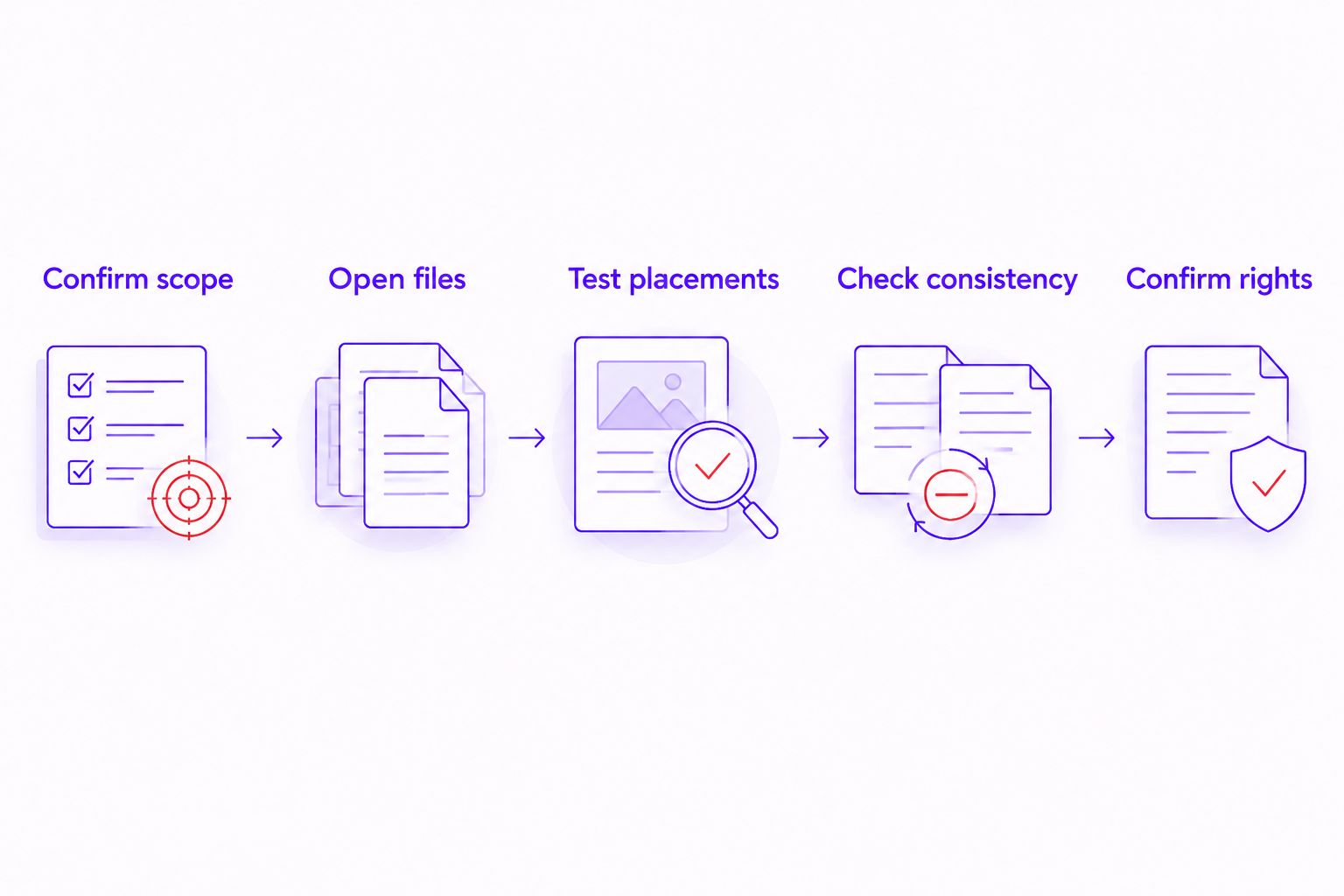
Use this sequence before signing off the handover. Keep design approval separate from delivery approval: liking the logo does not prove the files are complete.
- Confirm scope. Match the delivered folder against the approved proposal, including formats, variations and documentation.
- Open files. Check that the source and exports open, and resolve missing assets or font warnings.
- Test placements. Put the relevant files into a website layout, presentation and supplier proof where applicable.
- Check consistency. Compare spelling, proportions, colours and backgrounds across the approved versions.
- Confirm rights. Keep the ownership terms, permitted uses and third-party licence requirements with the handover.
A 2026 delivery checklist should name the person responsible for resolving problems found during these checks. Agree the acceptance process in the proposal rather than negotiating it after delivery.
Does receiving source files mean you own the logo?
Receiving source files does not itself establish ownership. File delivery and intellectual property terms are separate matters, so the agreement must explain the rights you receive and any conditions attached to them.
Ask who created the artwork, whether third-party elements are involved and what licences apply. A font licence, for example, is separate from receiving a logo file. Keep the relevant documentation rather than assuming every asset can be transferred or reused without restrictions.
What should you ask before hiring logo design services?
Ask for the handover list before discussing the final proposal. Your questions should expose the boundaries of the project, not just the number of concepts presented.
- Which editable source file and export formats are included?
- Which logo variations will be designed and delivered?
- What colour specifications and usage instructions will accompany them?
- Are font licences or other third-party rights required?
- Who checks the files against printer and website requirements?
- What happens if a delivered file fails an agreed acceptance check?
- Which ownership terms apply to the approved artwork?
When briefing CreativHeads, connect the logo scope to any website or marketing work you are commissioning. Ask for shared deliverables and responsibilities so each team uses the same approved identity rather than rebuilding it independently.
Can you accept just a PNG logo?
A PNG alone is not a complete handover for a business commissioning an editable logo identity. It is useful for digital placements, but it does not provide the vector master needed for reliable resizing and design changes.
If you only need a restricted digital asset, a narrower scope can be deliberate. Put that restriction in writing so nobody mistakes an image-only delivery for a full identity handover.
FAQ
What files should I get from logo design services?
Logo design services should provide an editable vector master, suitable vector exports, transparent PNG files, approved variations and usage instructions. Confirm colour specifications, font requirements and ownership terms in the proposal.
Is an SVG logo better than a PNG logo?
SVG is better for resizing supported digital artwork, while PNG is better for everyday image uploads. Keep both because not every platform accepts SVG.
How can I tell whether my logo PDF is vector?
Ask the designer to confirm that the logo contains vector artwork, then have it inspected in suitable design software. A PDF extension alone does not establish that its contents are vector.
Do I need an EPS file for my logo?
You need EPS when a production supplier requests that format. Check the supplier’s requirements because EPS has limitations around transparency and newer effects.
Should my designer give me the font files?
Your designer should identify the fonts and explain the licences needed for your intended use. Font files should only be transferred when the licence permits it; outlined logo lettering is a separate deliverable.
Will the logo look exactly the same on screen and in print?
Screen and print colours do not behave identically. Request RGB and CMYK specifications, then use a production proof to approve important printed applications.
What should I do if the logo files are incomplete?
Compare the delivery with the agreed handover checklist and request the missing items through the project’s acceptance process. Name each missing format, variation or document rather than asking for more files generally.
One last thing
Do not use a file extension as an acceptance test. A PNG can sit inside a PDF, and a source document can still depend on missing assets. The contents matter more than the filename.
For your 2026 handover, ask for a single file index that maps each approved asset to its intended use. Store that index with the artwork and rights documentation so the next supplier receives instructions, not a guessing exercise.
Related guides